








































New to KubeDB? Please start here.
Neo4j Compute Autoscaling
KubeDB can automatically adjust the CPU and memory assigned to Neo4j pods. A Neo4jAutoscaler observes real resource usage, generates recommendations, and creates a Neo4jOpsRequest when the recommended resources differ sufficiently from the current allocation.
Before You Begin
You should be familiar with:
Install Kubernetes Metrics Server before enabling compute autoscaling. The recommender uses resource metrics collected from the Neo4j pods.
How Compute Autoscaling Works
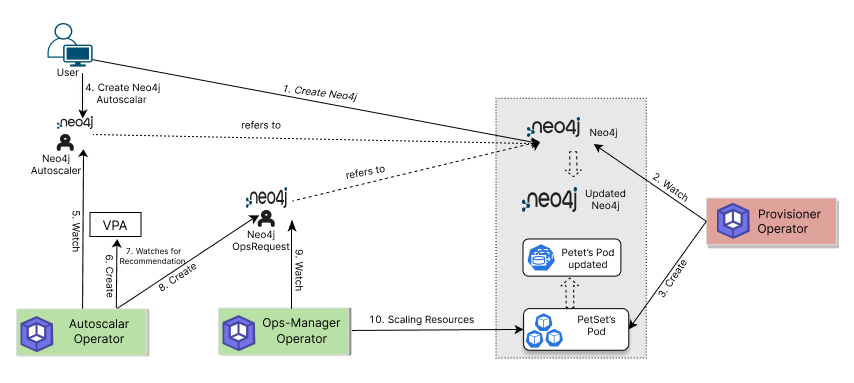
- The user creates a KubeDB
Neo4jresource. - The Provisioner creates the Neo4j cluster and its supporting Kubernetes resources.
- The user creates a
Neo4jAutoscalerwith aspec.compute.neo4jpolicy. - The Autoscaler creates and watches a Vertical Pod Autoscaler recommendation for the Neo4j container.
- After the pod lifetime and resource-difference thresholds are satisfied, the Autoscaler creates a
Neo4jOpsRequestof typeVerticalScaling. - Ops Manager applies the recommendation and updates the Neo4j pods within the configured minimum and maximum bounds.
The next guide demonstrates this workflow end to end.