










































New to KubeDB? Please start here.
Neo4j Storage Autoscaling
KubeDB can automatically expand Neo4j persistent volumes as graph data grows. The Autoscaler watches volume usage and creates a volume-expansion operation before the disks become full.
Before You Begin
You should be familiar with:
How Storage Autoscaling Works
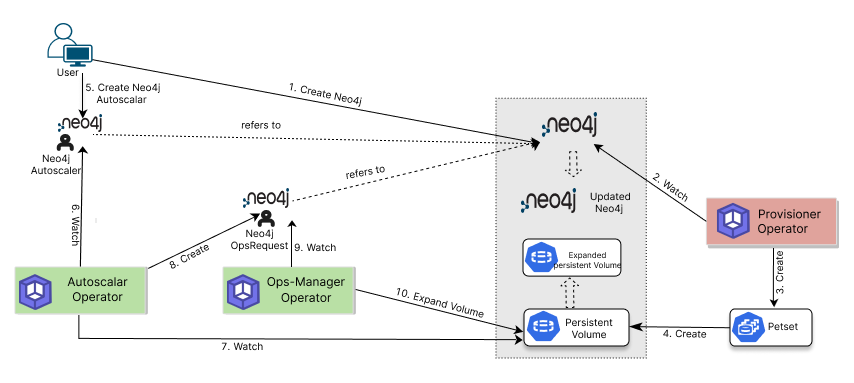
- The user creates a KubeDB
Neo4jresource with durable storage. - The Provisioner creates a persistent volume for every Neo4j pod.
- The user creates a
Neo4jAutoscalerwith aspec.storage.neo4jpolicy. - The Autoscaler reads PVC usage from the KubeDB storage metrics API.
- When usage reaches
usageThreshold, the Autoscaler calculates a larger size and creates aNeo4jOpsRequestof typeVolumeExpansion. - Ops Manager expands the PVCs using the configured online or offline mode.
Volume expansion requires a StorageClass with
allowVolumeExpansion: true. Kubernetes does not support shrinking a PVC after it has been expanded.
The next guide demonstrates this workflow using actual Neo4j graph data.